> For the complete documentation index, see [llms.txt](https://padtai.gitbook.io/padtai/llms.txt). Markdown versions of documentation pages are available by appending `.md` to page URLs; this page is available as [Markdown](https://padtai.gitbook.io/padtai/full-guides-and-tutorials/copy-trading.md).
# Copy Trading
Copy Trading on PADTAI closes the loop between signal discovery and capital deployment. Users can mirror trades from top traders while keeping full custody of funds and enforcing strict risk control.
**✨ The Copy Engine**
#### **Wallet-based mirroring with advanced controls**
* One wallet can copy multiple traders simultaneously
* Funds remain securely in your PADT.AI swift wallet at all times
* Advanced position sizing controls with custom leverage and weight settings
#### **Position Management & Risk Controls**
**Position Sizing & Limits**
* Customizable position weight percentage
* **Up to 10 open positions** maximum
* **Long trades only** (shorts coming soon)
* **No duplicate exposure** - if you already hold a token, new signals are automatically skipped
**Leverage Controls**
* **Custom leverage setting** - choose your preferred leverage for each position
* Set custom leverage and weight % before opening positions
* Maximum leverage limited by 10x leverage
* Position sizing controls allow you to adjust risk per trade
**Token exposure**
* **No repeated position for the same token** across your wallet.
* If a new trade signal targets a token you already hold, the system **skips** that trade.
**Risk controls**
* Configure **TP/SL** for percentage for overall position
* Close any position manually at any time (doesn't affect original trader's position)
* View detailed performance metrics for each copied trader
* **Auto-close feature** - positions automatically close after up to 7 days to manage risk
***
### How It Works: From Deposit to Withdraw (Tutorial)
1. **Deposit Funds**
* Go to **"Copy Trading Setting" → Deposit**
* Select **USDC on Arbitrum (ARB)**
* Deposit to your PADT.AI swift wallet
**Important**: Funds always remain in your PADT.AI swift wallet - never leaves your control
* Choose asset and network **Arbitrum**; transfer funds to your PADTAI wallet.
{% embed url="" %}
2. **Choose a Trader**
* Head to the **Copy Trading dashboard**
* Review comprehensive trader statistics:
* **ROI** (Return on Investment)
* **Win rate** percentage
* **Drawdown** history
* Performance consistency
* Risk metrics
**Built-in Risk Protection:**
* Up to 10 open positions maximum
* Long trades only (short positions coming in future updates)
* No duplicate token exposure across your portfolio
{% embed url="" %}
* Open the **Copy Trading** dashboard.
* Review trader stats (performance consistency, drawdown, win rate).
3. **Start Copying**
**Simple Setup Process:**
* Click **"Copy"** on your selected trader
* Configure your position sizing and leverage preferences
* Set custom risk parameters if desired
* Begin mirroring their trades automatically
**Integration Options:**
* Use PADT.AI directly for core functionality
* Connect to [BasedApp.io](https://www.basedapp.io/) or [Hyperliquid ](https://app.hyperliquid.xyz/trade)for manually mange your positions and funds.
**Trader Management:**
* **Remove traders** when you no longer want to copy them
* Stop copying any trader at any time without affecting existing positions
* Add or remove multiple traders as your strategy evolves
{% embed url="" %}
4\. **Manage Your Trades**
**Active Position Management:**
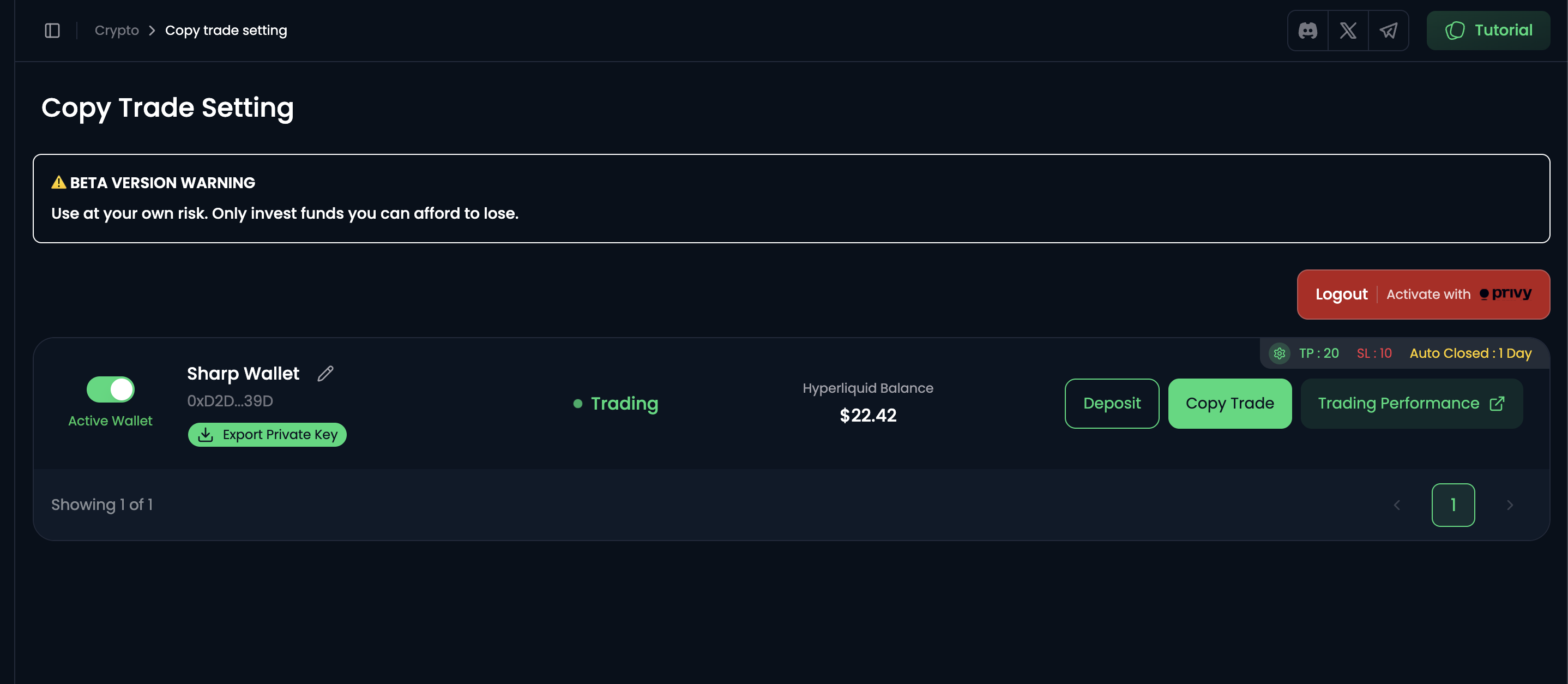
* All copied trades appear in **"Copied"** section
* **Close trades anytime** - manual override without affecting the original trader's position
* **Smart duplicate protection** - if you already hold a token, new signals for that same token are automatically skipped
{% embed url="" %}
**Advanced Position Controls:**
* **Custom leverage setting** - adjust leverage for each position (1× to token maximum)
* **Margin management** - monitor and manage margin requirements for leveraged positions
* **Auto-close feature** - positions automatically close after up to 7 days to manage risk
* **Position sizing** - control the percentage of your portfolio allocated to each trade
* **Configure TP/SL** - set take profit and stop loss percentage overall position
{% embed url="" %}
**Performance Monitoring:**
* View real-time performance within PADT.AI dashboard
* Track detailed analytics on **Hyperdash** (@hypurrdash)
* Monitor positions on **Hyperliquid** (@HyperliquidX)
* Access comprehensive performance reports and metrics
{% embed url="" %}
#### 5. Withdrawal
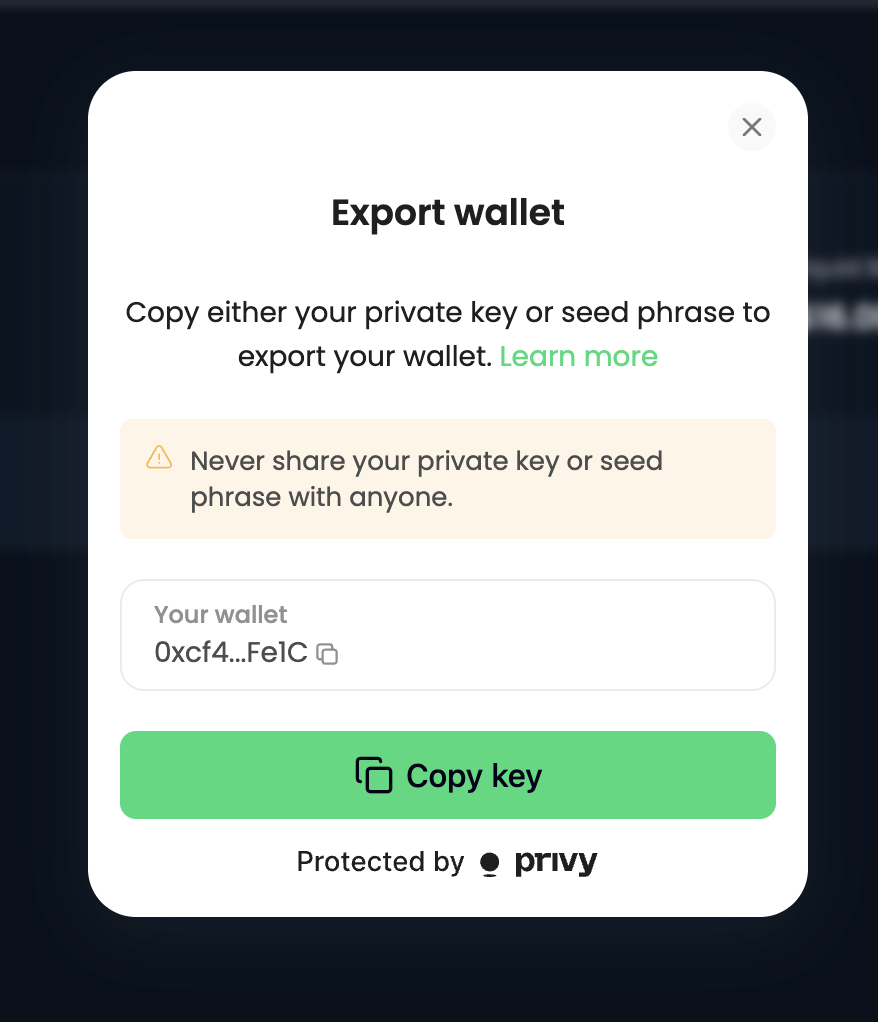
* **Click "Export Private Key" and import it to your web3 wallet, and then go to Hyperliquid to withdraw the fund.**
* Disclaimer PADTAI don't want to access user fund so we let user Withdraw they fund my them self via hyperliquid
***
### Future Plan / Roadmap
* [ ] **Customizable % position** — choose allocation per trader or per trade (beyond fixed 10%).
* [ ] **Short positions** — enable mirrored shorts in addition to longs.
* [ ] **Separate long & short positions** — allow holding both directions on the same token independently.
* [ ] **1 CT = 1 Wallet (segregation)** — isolate positions per copied trader to **prevent cross-interference** between traders’ signals.
***
### FAQ
**Can I copy multiple traders at once?**\
Yes. Your wallet can mirror multiple traders, subject to the **10-position cap** and **no-duplicate-token** rule.
**What happens if two traders open the same token?**\
If you already hold that token, additional signals for the same token are **skipped** (until the position is closed).
**Do traders have access to my funds?**\
No. Funds stay in **your wallet**. PADTAI only mirrors signals.
**Can I set different TP/SL per position?**\
Yes — TP/SL are configured **per position**.